Users
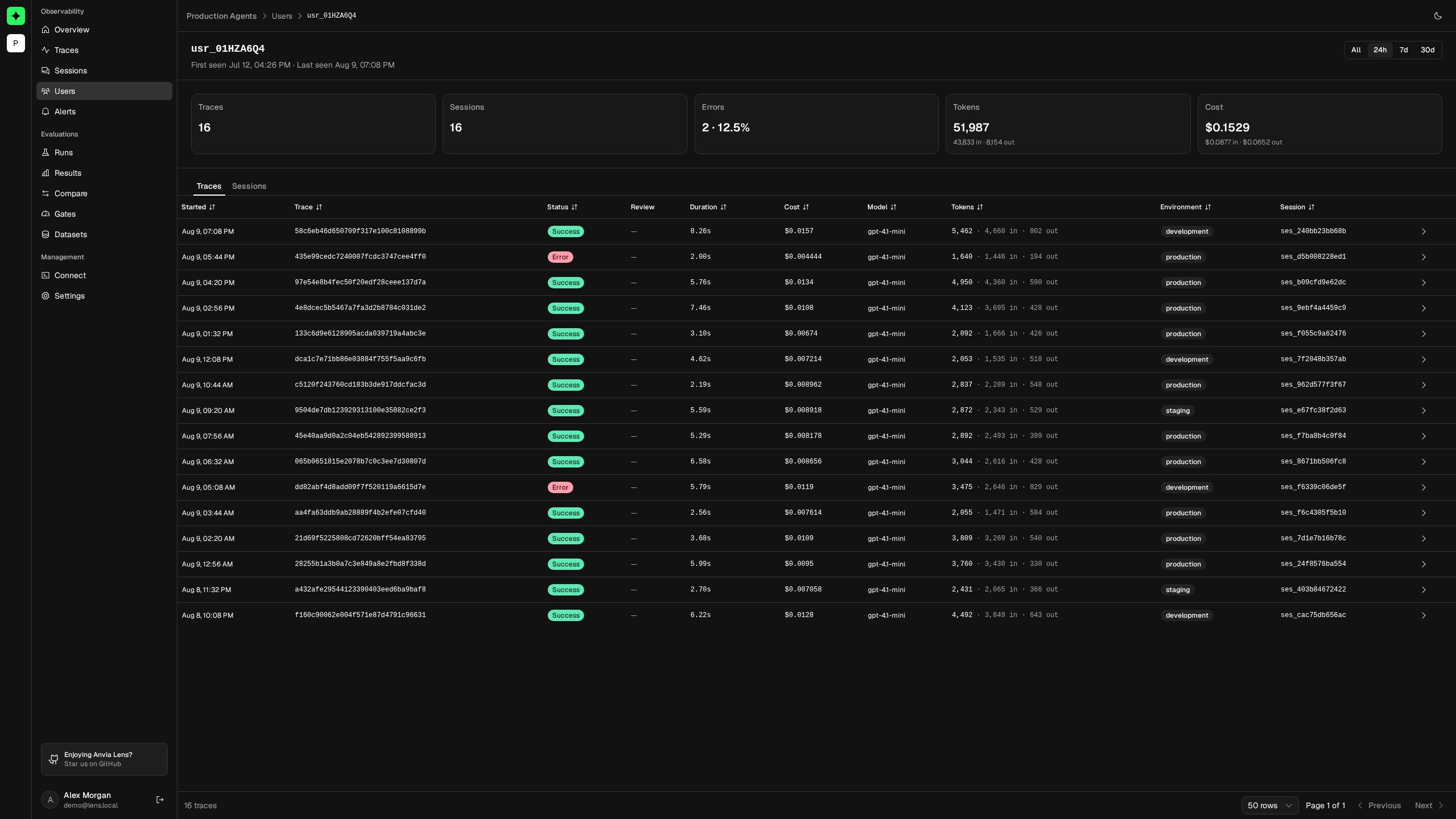
The Users view groups telemetry by the userId supplied by your application. It helps support and reliability teams answer questions such as: Is this failure isolated to one user? How many sessions were affected? Is one account responsible for unusual token or cost growth?
Lens does not create or authenticate application users. It treats userId as an exact telemetry dimension.
Supply a safe, stable identity
Add the same opaque application identifier to every relevant request:
const response = await agent.generate({
    messages: messages,
    trace: {
        name: 'assistant-reply',
        userId: account.telemetryId,
        sessionId: conversation.id,
    }
})
Use an internal ID that remains stable across sessions. Avoid email addresses, display names, access tokens, or other sensitive and mutable values. Authorization must still be enforced by the application; knowing a Lens user ID does not grant access to that product user.
Explore user activity
Open Users, choose All, 24h, 7d, or 30d, and search by user ID. The table can show and sort by:
- first and last seen time;
- traces and distinct sessions;
- failed trace count and error rate;
- input plus output tokens;
- total calculated cost.
Use All when confirming whether Lens has ever observed an identity. Use a fixed range when investigating a recent regression or comparing active users on the same basis as the project overview.
The range determines which users appear and which traces contribute to activity totals. First seen and Last seen remain lifetime timestamps for that identity, so they can fall outside the selected activity window.
Interpret user metrics
| Metric | Calculation |
|---|---|
| Traces | Traces for this user inside the selected range. |
| Sessions | Distinct non-empty session IDs in those traces. |
| Errors | Traces with an error status. |
| Error rate | Failed traces divided by traces in the range. |
| Tokens | Input and output tokens summed across the user's traces. |
| Cost | Available trace cost summed across the user's traces. |
A user can have many traces and zero sessions when the application supplies userId but not sessionId.
Investigate one user
Open a row to see the user's summary and two activity tabs:
- Traces lists the exact requests attributed to the user. Open one to inspect its observation tree, payloads, tool calls, and errors.
- Sessions lists conversations or workflows carrying both that
userIdand a session identifier. Open one to read the chronological interaction.
The time-range control applies to the cards and both tabs. Use the same range as the original incident report, then sort by cost, tokens, duration, or status to find the strongest candidate.
For example, when a customer reports intermittent failures:
- Search for their internal telemetry ID.
- Select the period that contains the report.
- Check whether the error rate is isolated or repeated.
- Open Traces and inspect a failed request.
- If the issue depends on prior turns, switch to Sessions and reconstruct the surrounding interaction.
Identity boundaries
Lens trusts the identifier supplied by instrumentation. It does not merge aliases, resolve account migrations, or know whether two IDs represent the same person. If an application changes its user-ID scheme, Lens records separate identities unless the telemetry producer keeps a stable mapping.
For multi-tenant applications, include tenancy in the opaque identifier or ensure IDs are globally unique. Do not put tenant names or personal data into the ID merely to make the table easier to read.
Troubleshoot missing or surprising users
The user does not appear
Confirm that the trace contains a non-empty userId, that the correct project received it, and that the selected range includes a trace for that user. Lens does not derive identity from session IDs or captured messages.
Session totals are lower than expected
Only distinct, non-empty sessionId values count. Traces attributed to the user without a session still contribute to traces, tokens, errors, and cost.
Cost is blank or too low
Cost depends on telemetry-reported values or matching configured model prices. Review Costs and confirm that the affected generations include model names and token usage.
Continue with Sessions for conversation-level analysis or Traces for the exact runtime path of one request.