Configure gates
Open Evaluations → Quality gates, then select New gate. Owners and admins can create or edit a gate; other project members can inspect the saved policy.
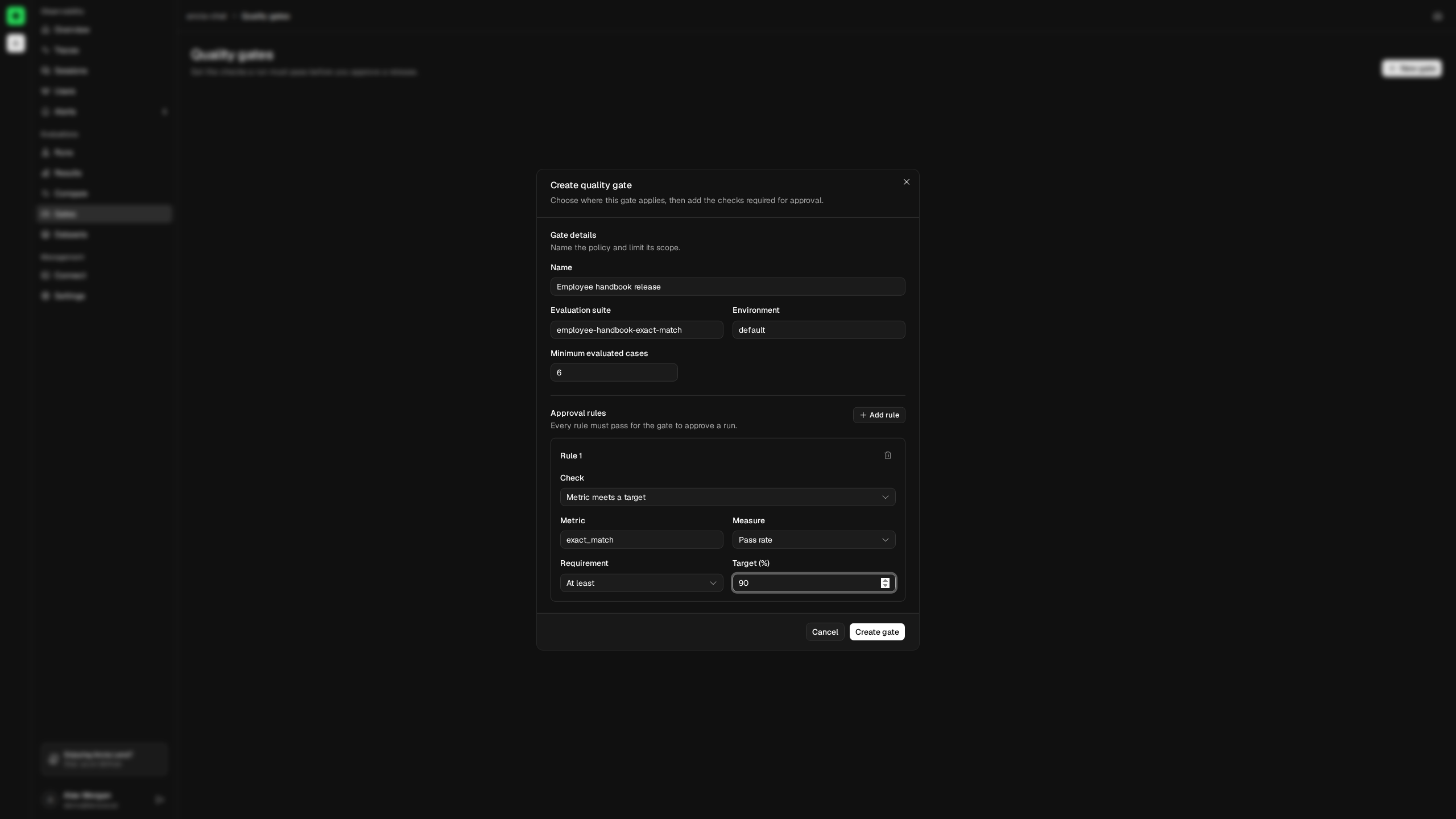
Define the scope first
Enter a recognizable name, the exact evaluation suite name, and the exact environment reported by the candidate and baseline runs. Scope matching is case-sensitive because it uses the emitted values.
Set Minimum evaluated cases high enough to prevent a partial or smoke-test run from approving a release. Lens accepts 1 through 1,000,000 cases.
Every gate requires at least one approval rule and supports at most 25.
Metric meets a target
Use this rule for an absolute requirement on a named evaluator:
correctness pass rate is at least 95%
toxicity average score is at most 0.10
Choose pass rate or average score, then at least or at most. Pass-rate values are entered as percentages in the UI. Average score requires numeric evaluation results; it is unavailable for a purely categorical or Boolean metric with no numeric value.
The verdict is insufficient_data if the named metric is absent or its candidate measure cannot be calculated.
Metric change stays within a limit
Use this rule to protect a baseline-relative quality measure:
correctness pass rate may decrease by no more than 2 percentage points
verbosity average score may increase by no more than 0.10
Pass-rate regression uses percentage points, not relative percentage. A change from 96% to 93% is a three-point decrease and fails a two-point limit.
This rule needs the metric and measure on both candidate and baseline. If either required value is missing, the result is insufficient_data.
Operational metric stays within a limit
Operational rules limit the candidate's percentage increase in:
- P95 trace duration.
- Average total tokens.
For example, a maximum increase of 15% passes when latency changes from 1,000 ms to 1,120 ms and fails at 1,160 ms.
These rules require complete trace coverage for both runs, a candidate value, and a positive baseline value. Otherwise Lens returns insufficient_data. This prevents missing telemetry from looking like an operational improvement.
A balanced first gate
For a production candidate, start with a small number of rules that have clear ownership:
| Requirement | Example |
|---|---|
| Population | At least 50 evaluated cases. |
| Quality floor | correctness pass rate at least 95%. |
| Regression budget | correctness pass rate decreases by no more than 2 points. |
| Operational budget | P95 trace duration increases by no more than 15%. |
Add a rule only when the metric is reported consistently and the team knows what action to take when it fails. A large collection of fragile rules produces insufficient_data more often than useful release decisions.
Validate in Compare
Open Compare releases, select compatible candidate and baseline runs, then choose the gate. Read every rule result—not only the overall badge—before copying the gate ID into CI.