Incidents
An incident is the durable investigation record created when an alert rule fires. Open Alerts and select the Incidents tab to filter active or resolved incidents by trigger type.
The Lens sidebar counts both open and acknowledged incidents as active.
Incident lifecycle
Open -> Acknowledged -> Resolved
\---------------------> Resolved- Open means the rule fired and no member has claimed the investigation.
- Acknowledged records who began investigating and when. It remains active and stays in the sidebar count.
- Resolved removes the incident from the active list while preserving its history.
Any project member can acknowledge an open incident or manually resolve an open or acknowledged incident. Acknowledgement is coordination metadata; it does not mute the rule or stop the signal from being evaluated.
Investigate a runtime incident
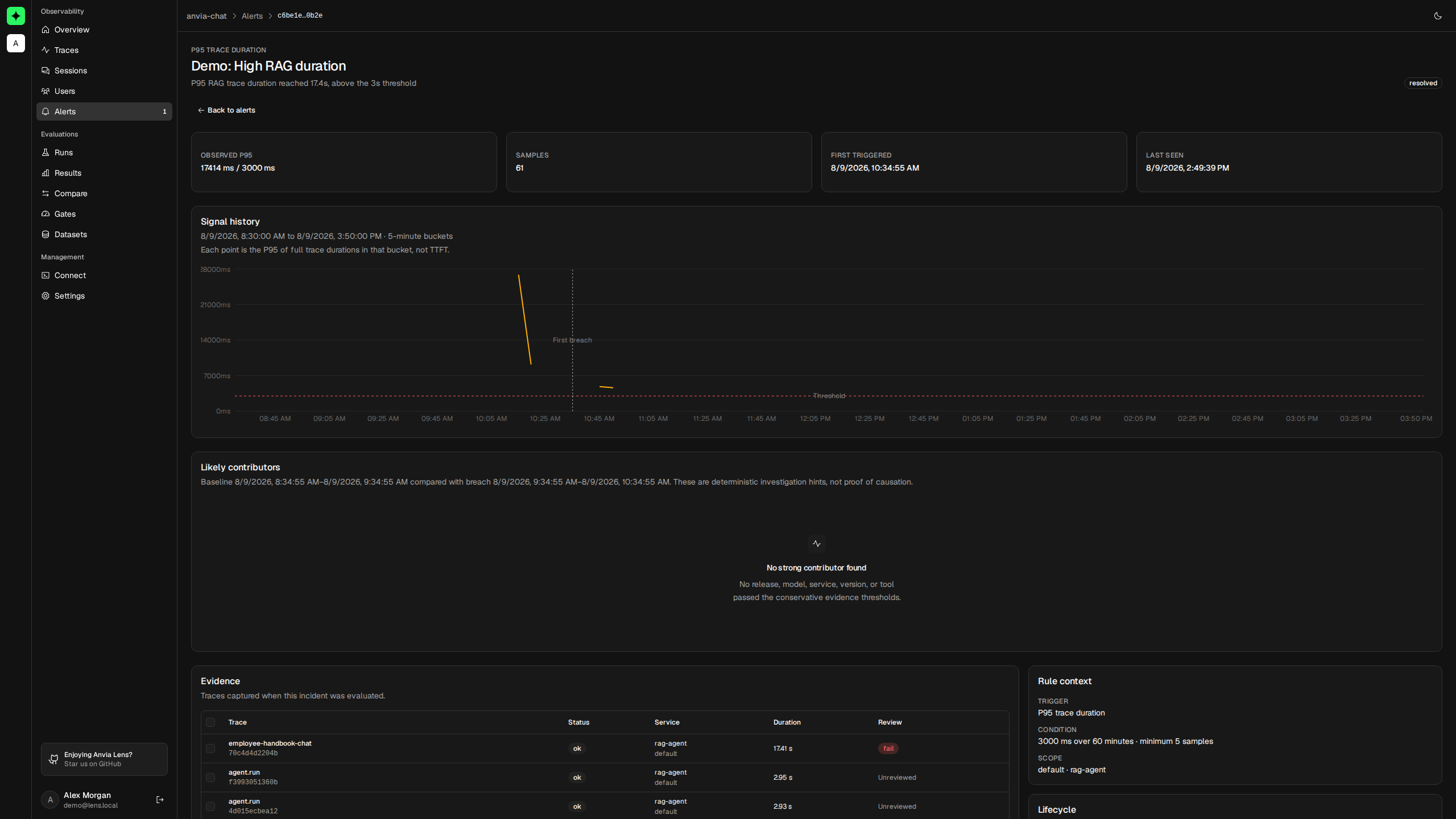
Open the incident to see the observed value, threshold, sample count, first trigger, and most recent breach. Runtime incidents can also include:
- A signal chart using the original rule scope and threshold.
- Up to five evidence traces captured from the measured window.
- The preserved rule condition and scope.
- A lifecycle showing trigger, acknowledgement, and resolution.
- Up to three likely-contributor hints for a changed release, service, service version, model, or tool.
The signal view shows at most 24 hours around the incident. It uses one-minute buckets for shorter ranges and five-minute buckets for longer ranges. P95 charts represent full trace duration, not time to first token.
Treat contributors as leads
Lens compares the window that caused the incident with the immediately preceding window of equal length. It applies conservative sample and change thresholds before showing a likely contributor, then links to representative traces when available.
These hints are deterministic comparisons, not causal conclusions. A new release can correlate with a regression without causing it. Open or compare the attached traces before deciding what changed.
Investigate a quality incident
A failed human-review incident links to the reviewed trace. A failed quality-gate incident links to the comparison of its candidate and baseline evaluation runs.
Quality incidents do not have runtime signal charts because they are created from discrete review or gate results. Use the linked trace or comparison as the primary evidence.
Resolution behavior
Runtime incidents resolve automatically when a later evaluation is below the threshold. Failed-review incidents resolve when the same trace receives a passing review. Quality-gate incidents resolve when the same gate and run comparison returns pass.
You can also resolve an active incident manually. For runtime rules, either manual or healthy automatic resolution resets the breach count and begins a 30-minute cooldown. Acknowledging does neither.
Editing or deleting a rule resolves its active incidents. The history remains available and records the reason even after the rule itself is gone.
Preserve useful failures
Project owners and admins can select up to five retained evidence traces from an incident and promote them into an existing managed dataset draft. Lens derives each case's input and preserves the observed output as a reference, but leaves the expected output blank.
Review every draft case before publishing it. A failed production output is evidence of what happened, not an expected answer.
Retention and missing evidence
Incident records live in PostgreSQL and remain after their source rule is deleted. The telemetry behind signal charts and trace links follows the project's telemetry retention policy, so an older incident can remain readable after its chart or evidence trace has expired.
The incident detail page makes this distinction explicit: missing telemetry does not delete the incident record. Deleting the project removes its rules and incidents with the rest of the project data.
Current delivery behavior
Lens does not currently send incident notifications outside the product. The sidebar's active count refreshes periodically, and an open incident detail refreshes periodically while you view it. Keep Lens open during active investigation; use an external monitoring and paging system for on-call delivery.
To tune what creates these records, return to Alert rules.