Compare releases
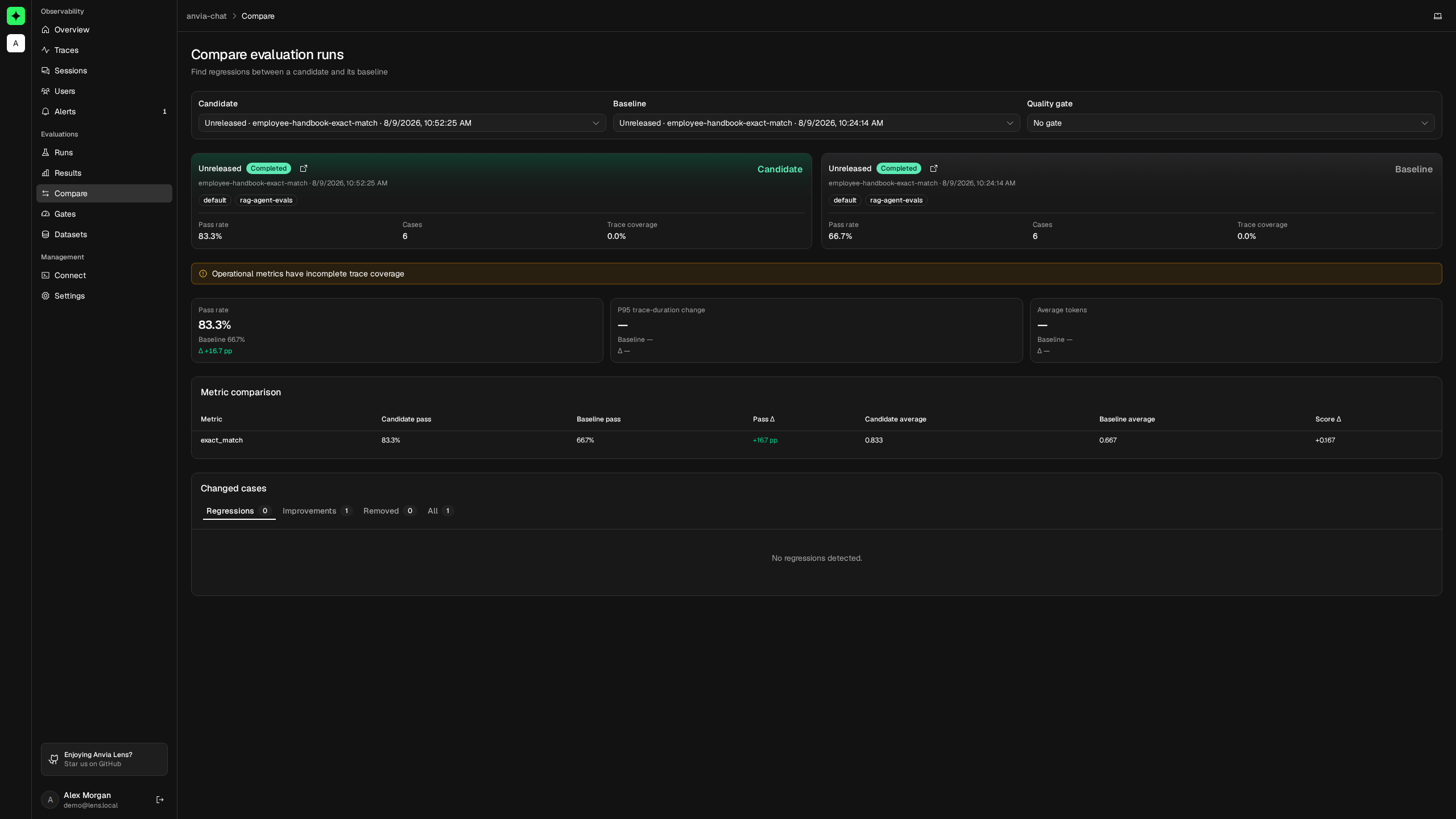
Release comparison places two completed evaluation runs side by side. Use it to determine whether a candidate changed quality, latency, token use, or specific cases relative to a known baseline.
The first run is the candidate and the second is the baseline. Lens calculates deltas as candidate minus baseline.
Prepare comparable runs
The runs must be completed and share the exact same suite name and environment. Their release and dataset version may differ.
For the clearest result, keep everything except the intended release change constant:
| Run field | Baseline | Candidate |
|---|---|---|
| Suite | support-release-readiness | support-release-readiness |
| Environment | staging | staging |
| Dataset | support-release-cases@v2 | support-release-cases@v2 |
| Release | 2026.08.1 | 2026.08.2-rc.1 |
Supply an immutable release identifier through the Lens tracing configuration:
const lens = new LensClient({
  environment: 'staging',
  release: process.env.APP_RELEASE,
})
const tracing = lens.observer()
Open a comparison
Open Evaluations → Compare, choose the candidate, then choose a compatible baseline. Once a candidate is selected, Lens limits the baseline selector to runs with the same suite and environment.
Verify both identity cards before reading the deltas. They show release, status, suite, time, environment, service, dataset version, pass rate, evaluated cases, and trace coverage.
Read the aggregate changes
Lens compares three run-level values:
- Pass rate — higher is usually better; the delta is shown in percentage points.
- P95 trace duration — lower is usually better.
- Average total tokens — lower normally means less model usage, but judge the trade-off against quality.
Operational values come from traces linked to evaluation results. A run with incomplete trace coverage can still be compared, but Lens warns you and an operational quality-gate rule will return insufficient_data.
Lens also warns when the runs use different datasets or versions. Treat such a comparison as directional: a delta may come from the changed case population rather than the release.
Compare evaluator metrics
The metric table aligns results by metric name and reports each side's result count, pass rate, average numeric score, and delta. A metric present in only one run remains visible.
Keep metric names stable across releases. Renaming correctness to answer-correctness prevents Lens from treating them as the same measure.
Investigate changed cases
Lens aligns cases by case ID and metric name, then classifies changes:
| Classification | Meaning |
|---|---|
| Regressed | The candidate is fail or invalid while the aligned baseline was not. |
| Improved | The baseline is fail or invalid while the aligned candidate is not. |
| New failure | A fail or invalid candidate result has no aligned baseline result. |
| Removed | A baseline result has no aligned candidate result. |
Open the linked candidate and baseline traces to determine whether the cause was a prompt, model, tool, retrieval result, or application change. Lens returns at most the first 100 changed-case rows in the comparison view, while the counts reflect the complete comparison.
Turn evidence into a verdict
Select a compatible quality gate to apply the same release policy every time. A gate does not deploy, merge, or block anything by itself; it produces a pass, fail, or insufficient_data verdict.
Continue with Quality gates to define the policy, or CI enforcement to make that verdict control a pipeline.