Sessions
A session groups traces that belong to one conversation or multi-step workflow. Use it when a single trace explains one request, but the customer experience depends on several requests in sequence.
Lens only groups traces that carry the same non-empty sessionId. It does not infer a session from timing, user identity, or similar prompt text.
Instrument a session
Choose an opaque identifier from the application that owns the conversation, then reuse it for every related request:
const reply = await supportAgent.generate({
    messages: messages,
    trace: {
        name: 'support-reply',
        sessionId: conversation.id,
        userId: account.telemetryId,
    }
})
sessionId creates the session. userId is optional, but supplying both lets you inspect one conversation from the session view and all of that user's conversations from the user view.
Prefer stable internal identifiers over email addresses, names, or prompt-derived values. Lens is an operational system, not the source of truth for conversation ownership or authorization.
Find the affected interaction
Open Sessions and select a time range. Search matches the session ID or user ID. The filter panel can narrow the list by:
- status and user;
- environment, service, model, and tag;
- minimum or maximum duration;
- minimum or maximum total tokens;
- minimum or maximum total cost.
Facet counts adapt to the other active filters. For example, after selecting an environment, the model facet describes models present in sessions from that environment.
Use Columns to keep the table focused on the current investigation. Available values include start and last-seen time, status, user, traces, spans, duration, tokens, cost, environments, and services. Headers that represent sortable fields can be used to surface the slowest, largest, newest, or most expensive sessions.
Understand the session summary
The explorer aggregates traces that start inside the selected time window.
| Field | Meaning |
|---|---|
| Status | error when at least one included trace failed; otherwise success. |
| Duration | Time from the earliest included trace start to the latest included trace end. It is not the sum of trace durations. |
| Traces and spans | Total runtime activity grouped into the session. |
| Tokens and cost | Sums across the included traces. |
| Last seen | Most recent telemetry update for the grouped traces. |
Because the explorer is range-scoped, an older session can appear with only its recent traces included. Opening the session loads its retained history rather than preserving the explorer's range filter.
Read the conversation
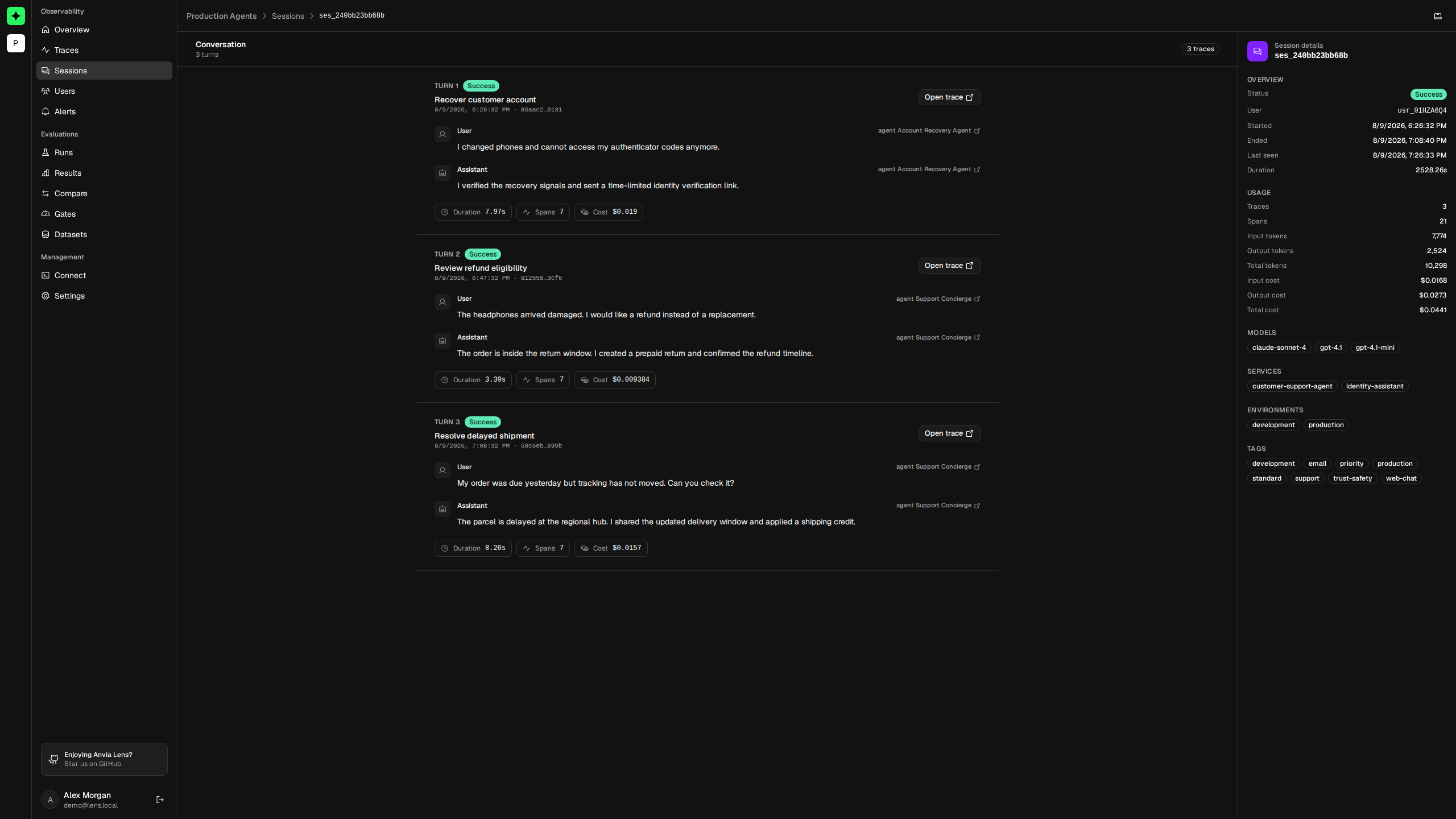
The session detail orders traces chronologically and presents each trace as a turn. Every turn includes:
- the best available user input and final non-tool response;
- trace status, timestamp, duration, span count, and cost;
- a direct link to the source trace.
Open the trace when the conversation shows what went wrong but not where. The trace observation tree reveals individual generations, tool calls, timings, and errors.
The metadata panel aggregates the whole retained session: user, start and end times, trace and span counts, input and output tokens, cost, models, services, environments, and tags. Long sessions load turns in batches; use Load more to continue through the remaining retained activity.
Why conversation content can be empty
A session can exist even when Lens has no prompt or response body to render. This happens when:
- native Anvia tracing uses safe capture mode;
- an upstream exporter omits input or output attributes;
- retention has removed the relevant payload-bearing telemetry;
- the recorded payload does not contain a value Lens can display as a turn.
Identifiers, timing, status, tokens, and cost remain useful without payloads. Enable full capture only after reviewing the data boundary in Capture and privacy.
Common mistakes
Every request creates a separate session
The application is generating a new sessionId for each turn. Persist the conversation identifier and reuse it until that conversation ends.
Traces exist but the Sessions page is empty
Those traces do not contain a non-empty sessionId, or they fall outside the selected range. Add trace context and send a new request; Lens does not retroactively infer sessions.
One session contains unrelated users
The same session identifier is being reused too broadly. Session IDs should identify a single logical interaction within the application's tenancy boundary.
Continue with Users to follow an application identity across sessions, or Traces for request-level investigation.