Costs
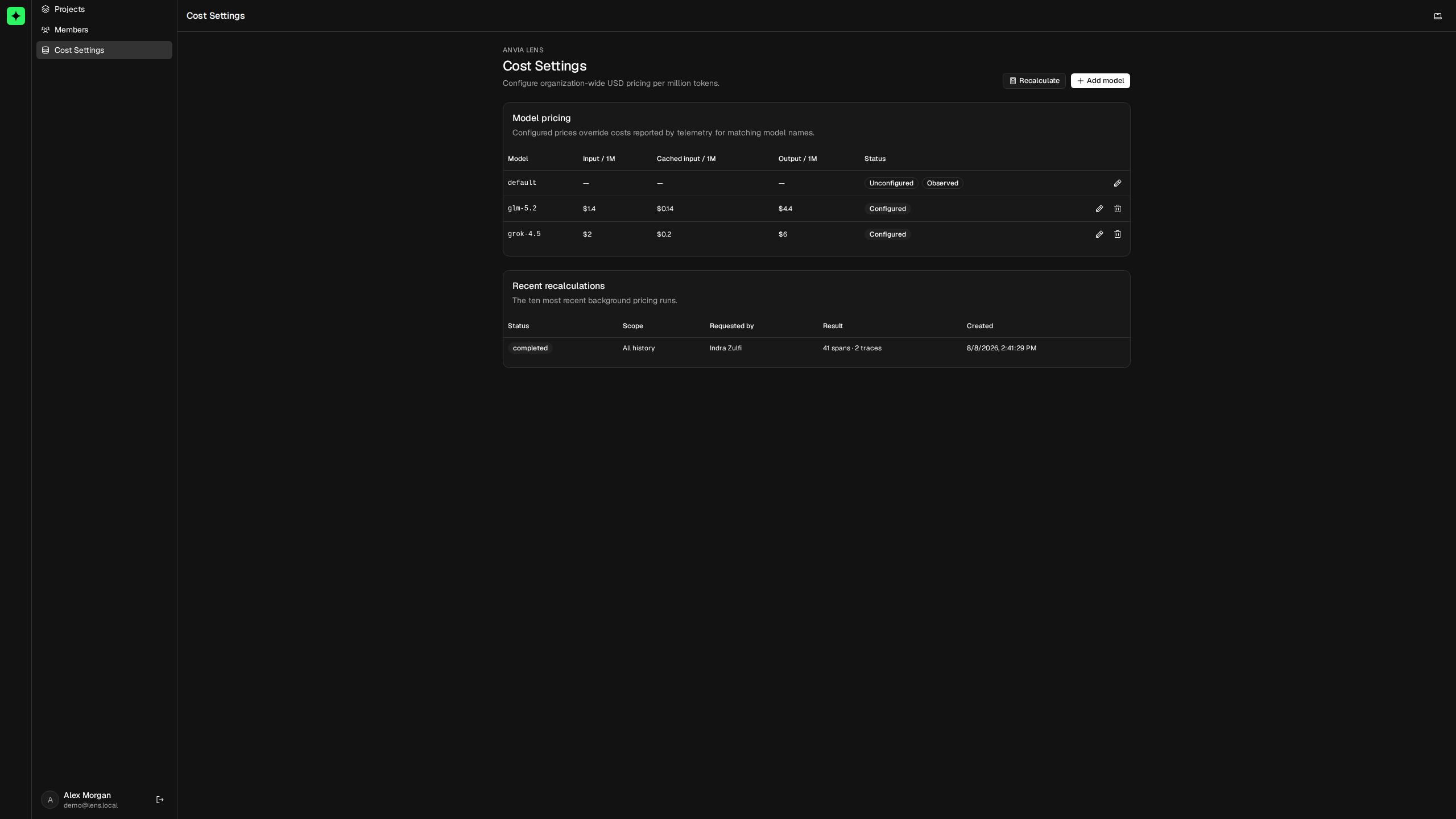
Lens aggregates model cost across traces, sessions, users, and the project overview. It can use costs reported by telemetry or calculate them from organization-wide token prices configured in Cost Settings.
Configure prices when the provider does not report cost, when reported values are inconsistent across integrations, or when your organization has contract pricing that differs from a provider's public rates.
Choose the source of cost
Cost follows this precedence for generation and embedding observations:
| Situation | Cost Lens stores |
|---|---|
| Exact model name has configured pricing | Lens calculates cost from token usage and replaces the reported cost. |
| Model has no configured pricing | Lens keeps the cost supplied by telemetry, when available. |
| Neither pricing nor reported cost is available | Cost remains unavailable. |
Configured pricing is organization-wide. An exact model entry applies to matching telemetry from every project in that Lens organization.
Configure a model price
Open Cost Settings. Models already seen in generation or embedding telemetry appear automatically as Observed. A model without a price is marked Unconfigured. You can also choose Add model before the first matching trace arrives.
Enter USD prices per one million tokens for:
- input tokens;
- cached input tokens, when the provider charges a separate rate;
- output tokens.
Leaving cached-input pricing empty makes cached tokens use the normal input rate.
Model matching is exact. If telemetry reports provider/model-v2 and pricing is configured for model-v2, Lens treats them as different models. Configure each emitted name separately or normalize model names consistently in the telemetry producer.
Understand the calculation
Lens separates cached tokens from uncached input tokens, then adds output cost:
uncached input = input tokens - cached input tokens

cost =
  (uncached input × input rate / 1,000,000)
  + (cached input × cached rate / 1,000,000)
  + (output tokens × output rate / 1,000,000)
For an illustrative model priced at $0.50 input and $1.50 output per million tokens, a generation with 800 input and 200 output tokens costs:
(800 × $0.50 / 1,000,000) + (200 × $1.50 / 1,000,000) = $0.0007Use the actual rate from your provider agreement. Cached-input tokens are capped at the reported input-token count before cost is calculated.
Apply a price change
Saving a price affects newly ingested matching telemetry. Historical observations keep their existing values until you explicitly recalculate them.
Choose Recalculate after adding or changing pricing:
- Select All history or a date range.
- Queue the recalculation.
- Follow its state under Recent recalculations.
- Refresh the overview or affected trace after the job completes.
Recalculation runs in the background across every project in the organization. It overwrites costs for matching generation and embedding observations, then refreshes their trace-level totals. Session, user, and overview totals reflect the updated trace costs afterward.
Only one organization recalculation can be queued or running at a time. The job uses a snapshot of all configured prices taken when it was requested, so editing a rate later does not change the active job. The page retains the ten most recent jobs with their scope, requester, status, affected spans, and affected traces.
Remove pricing safely
Removing a configured model price does not erase or restore historical cost. Existing rows keep their last stored values. Future telemetry for that model retains provider-reported cost when one exists; otherwise its cost is unavailable until pricing is configured again.
If you configured an incorrect price, edit it and run a recalculation over the affected time range instead of deleting it first.
Diagnose incorrect cost
Check these in order:
- Open an affected trace and confirm that its generation or embedding observation has the expected exact model name.
- Confirm that input, cached-input, and output token counts are present.
- Verify the configured price and whether cached input intentionally falls back to the input rate.
- For historical telemetry, confirm that a recalculation covering its timestamp completed successfully.
- If a recalculation stays queued, verify that the Lens worker and queue are running.
Cost is an operational estimate derived from the telemetry and rates available to Lens. Keep invoices and financial accounting in the systems that own those records.
Return to Observability to see cost by time, model, service, and trace. Use Sessions or Users to attribute it to application interactions.