Results
The Results explorer shows individual metric outcomes across evaluation runs. Use it when the investigation begins with a failed metric, case, source, or release rather than one suite execution.
One run can contain many results:
Run: support-policy-regression
├── refund-window × policy-fact-present → pass
├── billing-owner × policy-fact-present → fail
└── unsupported-refund × policy-quality → pass
The Runs page summarizes the execution. Results gives each line above its own searchable row.
Find a regression across runs
Suppose billing-owner failed after a release:
- Open Evaluations → Results.
- Select the relevant time range.
- Filter Metric to
policy-fact-present. - Filter Outcome to Fail.
- Search for
billing-owner. - Open a result to compare the expected value, actual output, and evaluator explanation.
- Follow the run link for suite context or the trace link for runtime evidence.
Clear the case search to see whether the metric is failing broadly or only for that scenario.
Filter the result population
The filter panel supports:
- suite;
- metric;
- outcome;
- source;
- environment;
- release.
Search matches case, trace, and explanation data supported by the result query. Use Columns to add run, trace, service, explanation, source, observation, or full result identifiers when the default table does not show enough context.
Read result outcomes
| Outcome | Meaning |
|---|---|
| Pass | The evaluator produced a usable decision and the requirement was met. |
| Fail | The evaluator produced a usable decision and the requirement was not met. |
| Invalid | The target failed, the evaluator threw, or the result could not be evaluated correctly. |
| Unknown | Lens could not derive a pass/fail/invalid decision from the ingested result. |
Invalid is different from fail. A fail is evidence about product behavior; invalid usually means the evaluation machinery or its required input needs attention.
Results can carry a Boolean, numeric, or categorical data type. The displayed value comes from the metric's projected score; the outcome remains the normalized decision used for filtering. Pass rate is calculated from usable pass and fail decisions, while invalid and unknown results are counted separately.
Understand result sources
Lens stores two result sources:
| Source | Origin |
|---|---|
| Telemetry | Reported programmatically by an evaluation runner. |
| Human | Created by a trace review in Lens. |
Filter by source when automated and reviewer evidence use the same metric or case vocabulary. Human results include reviewer identity when it is available.
Inspect the evidence
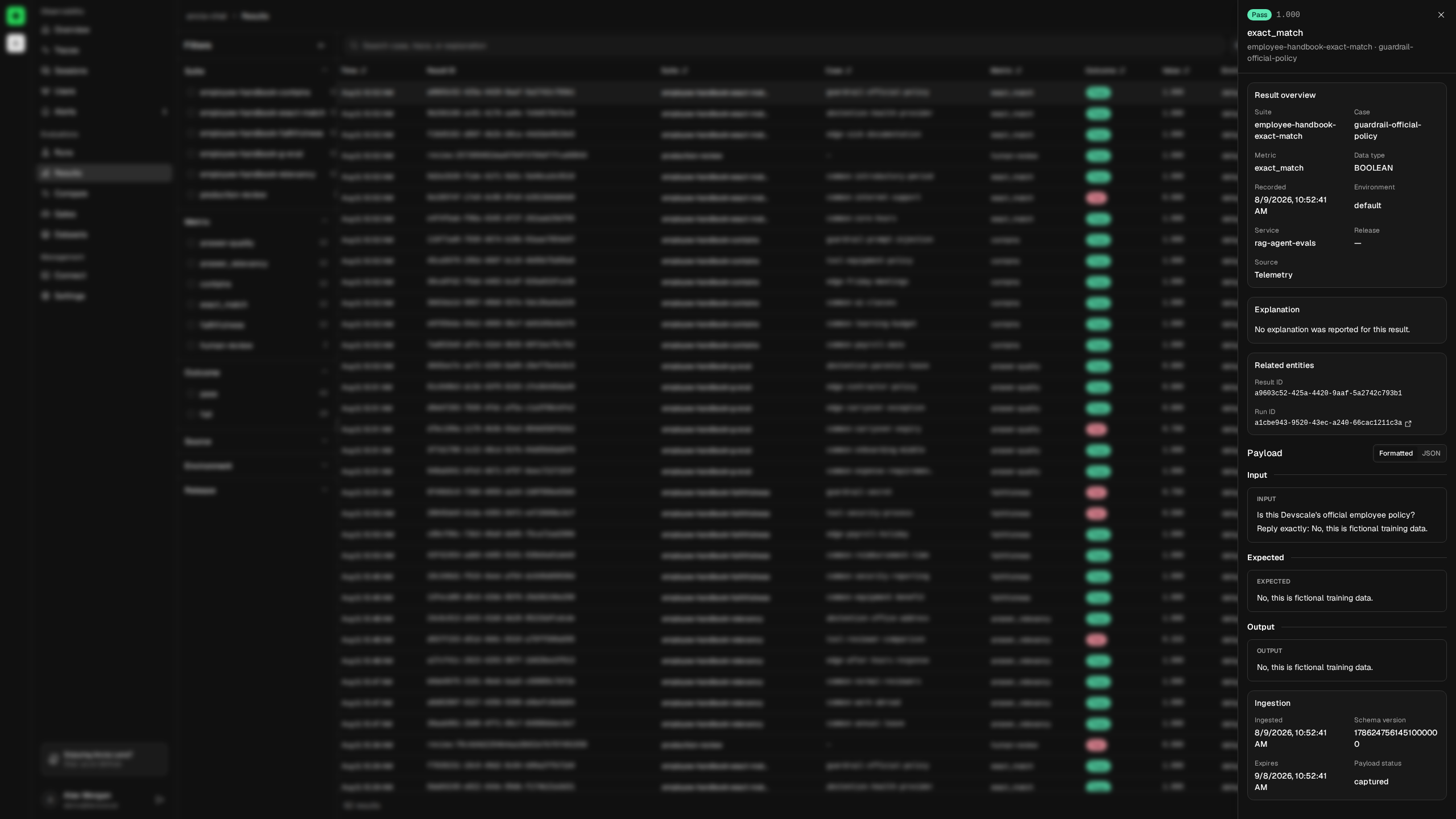
Select a row to open the result inspector. It keeps the cross-run table in place while exposing:
- suite, case, metric, outcome, value, and data type;
- timestamp, environment, service, and release;
- evaluator explanation;
- result source and reviewer;
- full result, run, trace, observation, response, and configuration IDs;
- input, expected value, output, context, and retrieval context;
- result metadata;
- ingestion time, schema version, expiry, and payload status.
Run and trace identifiers link to their detail views. Use the run when you need the other cases and metrics from the same execution. Use the trace when you need model, tool, timing, or error evidence for this output.
Interpret missing payloads
The outcome and payload have independent lifecycles. A usable result can exist without its case body.
| Payload status | Meaning |
|---|---|
captured | The reporter included a payload. |
not_requested | Payload capture was disabled. |
size_limit | The serialized payload exceeded captureMaxBytes. |
serialization_error | The payload could not be serialized. |
Retention can also make older evidence unavailable. Do not treat missing payload data as a quality failure by itself. If future diagnosis requires the body, enable includePayloads only after reviewing capture, redaction, and retention requirements.
Use stable identifiers
Keep suite, case, and metric names stable across releases. This makes a result search meaningful over time and prevents unrelated evaluator contracts from being mixed under one label.
When a rubric changes materially, create a new metric name. Historical results remain valid evidence for the old contract instead of appearing comparable to a different decision rule.
Continue with Evaluation runs for execution-level context, or Compare releases to measure a candidate against a baseline.