Tools
The Tools view is a development inventory of the tools available to each Studio agent. It brings static tools, dynamically indexed tools, and MCP-backed tools into one table, then lets you inspect the selected tool's input contract and invoke it without a model request.
Open http://localhost:4021/ui/tools when Studio is running on port 4021.
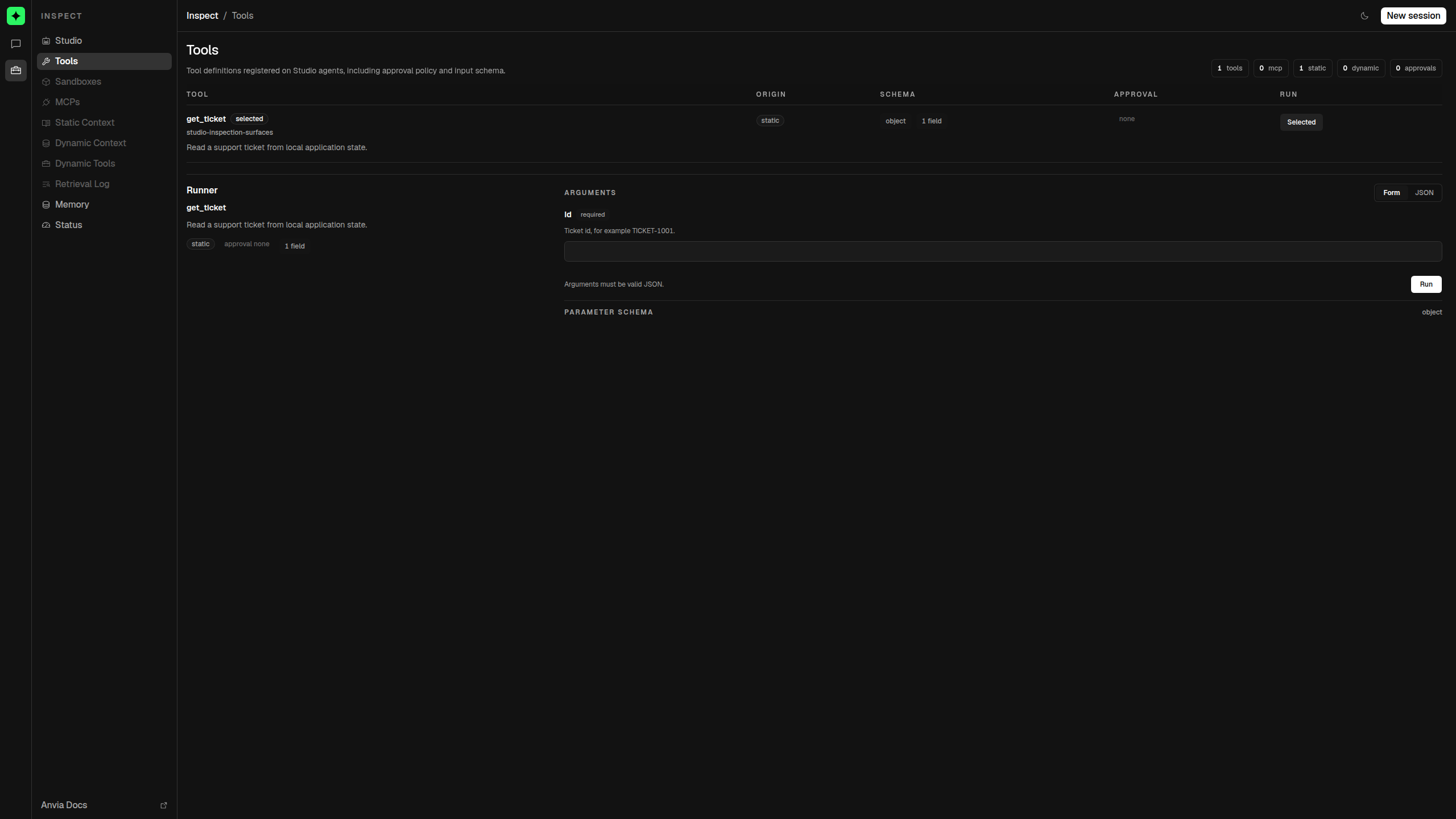
What Studio discovers
Studio reads tool definitions from the registered agent. For each tool it shows the name, description, origin, input schema, and discoverable approval policy.
| Origin | How the tool reached the agent | Label in Studio |
|---|---|---|
| Static | Added directly with the tools option. | static |
| Dynamic | Stored in a ToolIndex passed through the agent's tools option. | dynamic |
| MCP | Imported from a connected MCP server and carrying that server's provenance. | MCP / <server> |
MCP is provenance layered on top of registration. An MCP tool can be part of the agent's static tools while Studio presents its more useful server origin instead of a generic static label.
Dynamic tools shown here are the definitions available in the registered tool index. During an agent prompt, retrieval still decides which dynamic definitions to send to the model for that request.
A tool that is easy to inspect
Clear names, descriptions, and schema descriptions make both the model contract and the Studio UI easier to understand:
import { createTool } from '@anvia/core/tool'
import { z } from 'zod'

const getTicket = createTool({
  name: 'get_ticket',
  description: 'Read a support ticket from local application state.',
  inputSchema: z.object({
    id: z.string().describe('Ticket ID, for example TICKET-1001.'),
  }),
  outputSchema: z.object({
    id: z.string(),
    status: z.enum(['waiting_on_engineering', 'monitoring']),
    priority: z.enum(['high', 'medium']),
  }),
  execute: ({ id }) => loadTicket(id),
})
Register it on an agent and start Studio:
const agent = new Agent({
  id: 'support-inspector',
  model: model,
  name: 'Support inspector',
  tools: [getTicket],
})

new Studio([agent]).start({ port: 4021 })
The table will show get_ticket as a static tool with one input field. Select Use to open it in the runner.
Understand the registry
When several agents are registered, use the agent selector at the top of the view. The summary counts update for that agent:
- tools is the number of definitions in the current registry;
- static and dynamic describe registration source;
- mcp counts definitions with MCP server provenance;
- approvals counts tools that declare an approval policy.
Definitions with the same source and name are de-duplicated. Studio lists static definitions before dynamic definitions and sorts names within each group.
Inspection versus execution
The Tools view supports two related but separate jobs:
- Inspect the contract the agent and model see.
- Invoke the handler directly with test arguments.
Direct invocation is deliberately lower-level than a Playground run. It does not ask the model to choose the tool, and it does not create an agent turn. Most importantly, the tool runner is not an approval workflow: selecting Run calls the handler immediately, even if the registry says approval required.
Use the following pages for the details:
| Goal | Page |
|---|---|
| Understand fields, generated controls, and input/output validation | Inspect schemas |
| Exercise a handler and read results or failures | Run tools directly |
| Understand approval metadata and the Playground boundary | Approval behavior |
For production tool design, authorization, and middleware, continue to the Anvia SDK Tools documentation.