Sandboxes
Studio gives you a read-only view of explicitly registered sandbox inspectors. Use it to answer, “What is in the workspace, what is running, and what did it print?” while developing an agent.
Open http://localhost:4021/sandboxes. The compatibility path http://localhost:4021/ui/sandboxes redirects to the same page with the default UI configuration.
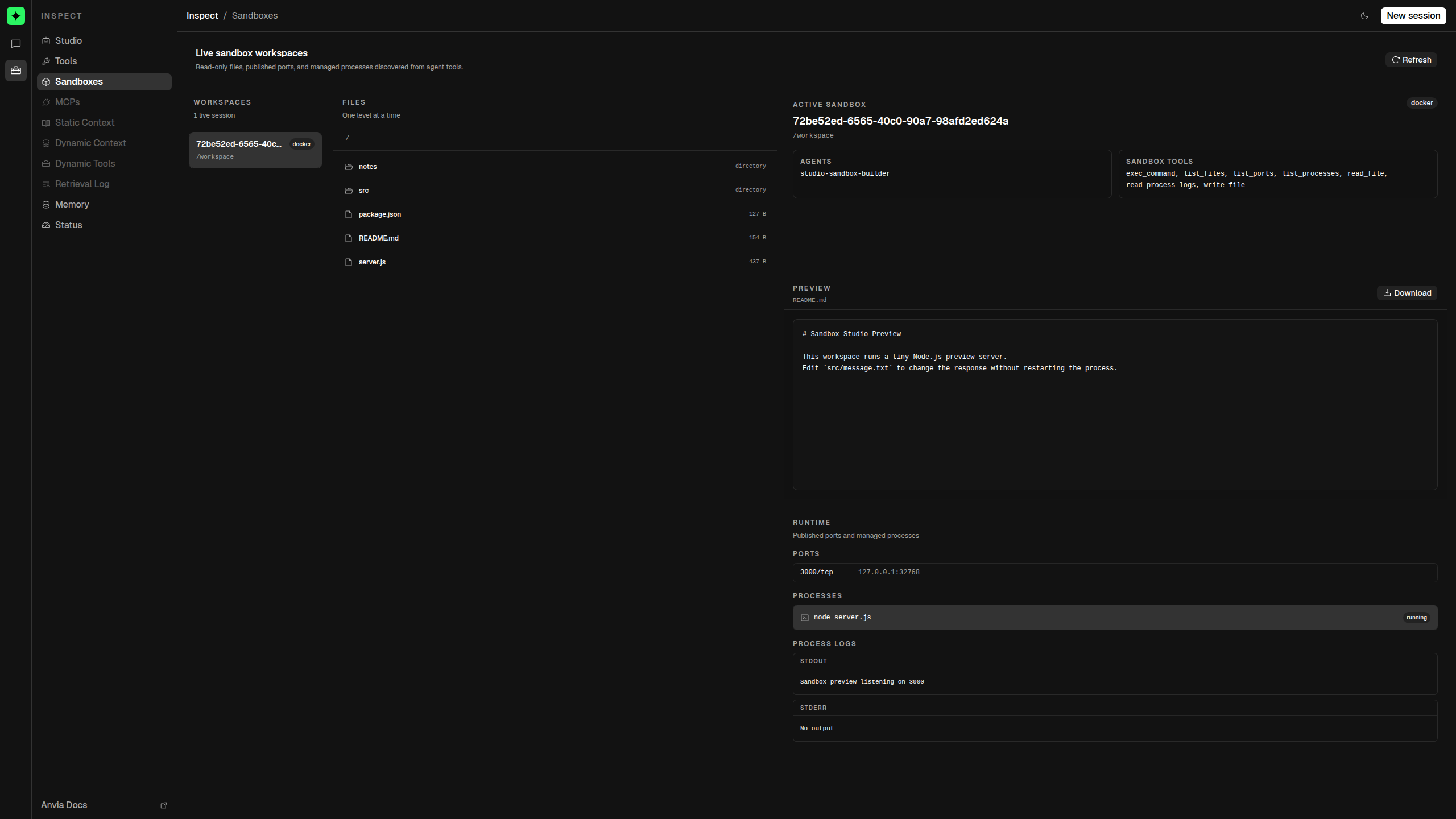
Register an inspector
Studio does not discover sandboxes from agent tools. Create a sandbox, choose the read capabilities to expose, and register the inspector explicitly:
import { Agent } from '@anvia/core/agent'
import {
  DockerSandboxClient,
  createDockerSandboxTools,
} from '@anvia/sandbox'
import { Studio } from '@anvia/studio'

const client = new DockerSandboxClient()
const sandbox = await client.createSandbox({
  image: 'node:22-bookworm',
  workspace: { type: 'ephemeral' },
  network: { mode: 'bridge', ports: [3000] },
  files: {
    'README.md': '# Sandbox workspace',
    'server.js': 'console.log("ready")',
  },
  runtime: {
    commandTimeoutMs: 30_000,
    maxOutputBytes: 128_000,
    maxFileBytes: 1024 * 1024,
    maxProcesses: 4,
  },
})

const tools = createDockerSandboxTools({
  sandbox: sandbox.runtime,
  tools: [
    'exec_command', 'read_file', 'write_file', 'list_files',
    'list_ports', 'list_processes', 'read_process_logs',
  ],
  exec: {
    commands: { mode: 'allow', values: ['node'] },
    maxTimeoutMs: 30_000,
  },
  readFile: { maxBytes: 128_000 },
  writeFile: { maxBytes: 128_000 },
  process: { maxLogBytes: 64_000 },
})

const agent = new Agent({
  id: 'sandbox-builder',
  model,
  tools: [...tools],
})

const studio = new Studio([agent], {
  sandboxes: [{
    inspector: sandbox.inspector({ files: true, ports: true, processes: true }),
    agentIds: ['sandbox-builder'],
    toolNames: tools.map((tool) => tool.name),
  }],
})
At least one inspector capability must be enabled. File inspection requires both listing and reading; process inspection requires both listing and log reading. agentIds must reference registered agents. Duplicate provider/ID registrations are rejected.
What you can inspect
| Surface | What Studio shows |
|---|---|
| Files | One directory level at a time, with breadcrumbs, entry type, and size. |
| File preview | UTF-8 text and common image formats, plus a download action. |
| Published ports | Container port and protocol mapped to the provider's host and host port. |
| Managed processes | Command, arguments, state, and bounded stdout and stderr. |
| Registered views | Authorized noVNC desktop views such as an @anvia/browser Chromium session. |
Studio previews recognized text and image files up to 1 MiB. Other binary files and larger previews are downloads. The runtime refuses file responses larger than 10 MiB, requires relative paths, rejects traversal, disables caching, and bounds process-log reads.
Register browser desktops through the sandbox registration's views array. See Browser desktop for automatic Playground display and human-control leases.
Inspector actions versus agent tools
The Sandbox page cannot write files, execute commands, start or stop processes, or destroy a sandbox. The agent tools can do only what their explicit tool tuple and policies allow.
Own the lifecycle
Studio never owns or destroys a registered sandbox:
try {
  await studio.serve({
    hostname: '127.0.0.1',
    port: 4021,
    onShutdown: async () => {
      await sandbox.destroy()
    },
  })
} catch (error) {
  await sandbox.destroy().catch(() => undefined)
  throw error
}
Studio is a development inspector, not a hosted sandbox control plane. Protect the Studio origin and treat file previews, process logs, and port addresses as sensitive.
Read-only API
GET /sandboxes
GET /sandboxes/:sandboxRef
GET /sandboxes/:sandboxRef/files?path=.
GET /sandboxes/:sandboxRef/files/content?path=README.md
GET /sandboxes/:sandboxRef/ports
GET /sandboxes/:sandboxRef/processes
GET /sandboxes/:sandboxRef/processes/:processId/logs?tailBytes=65536
Use the opaque ref returned by GET /sandboxes.